WE999 Deposit and Withdrawal Guide for Beginners
If you are new to WE999, one of the first things you will want to understand is how to add money and how to withdraw your balance. At first, the Deposit and Withdraw sections can look a little confusing, especially if you have never used an online gaming platform before.
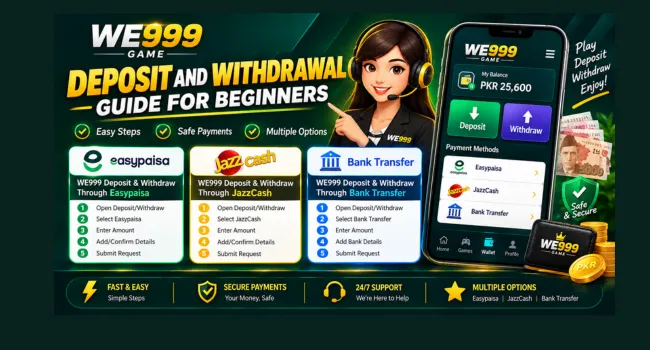
For users in Pakistan, Easypaisa, JazzCash, and Bank Transfer are commonly used payment options. The good thing is that the basic process is not difficult. You simply need to choose your payment method, enter the correct details, and follow the instructions shown in your account.
In this guide, we will explain the WE999 deposit and withdrawal process step by step so beginners can understand everything without any confusion.
What Does Deposit Mean in WE999 Game?
A deposit simply means adding money to your account. Once the money is added to your balance, you can use the available funds according to the platform’s features and games.
When you open the Deposit section, you may see different payment methods. The options can vary, so always use the payment method and account details displayed inside your own account.
If you are using WE999 for the first time, there is no need to rush. Take a moment to check the payment information before confirming the transaction.
How to Deposit Money in WE999
Making a deposit is usually a straightforward process.
First, log in to your account and open the Deposit section. Select the payment method you want to use and enter the amount you want to add. The platform will then show the payment information you need to complete the transaction.
After making the payment, return to your account and check your balance.
A simple deposit process looks like this:
- Log in to your account.
- Open the Deposit option.
- Select Easypaisa, JazzCash, or Bank Transfer if available.
- Enter your desired amount.
- Follow the payment instructions.
- Complete the payment.
- Check your balance.
Before sending money, always double-check the payment details. This small step can save you from a lot of trouble later.
WE999 Deposit With Easypaisa
- Open Deposit: Log in and open the Deposit section.
- Select Easypaisa: Choose Easypaisa from the payment options.
- Enter Amount: Add the amount you want to deposit.
- Make Payment: Follow the Easypaisa payment details and complete the payment.
- Check Balance: Return to the game and check your updated balance.
WE999 Deposit With JazzCash
- Open Deposit: Login WE999 and go to the Deposit section.
- Select JazzCash: Choose JazzCash as your payment method.
- Enter Amount: Enter the amount you want to add.
- Complete Payment: Follow the JazzCash instructions to make the payment.
- Check Balance: Check your balance after payment.
WE999 Deposit Through Bank Transfer
- Open Deposit: Go to the Deposit section in your gaming account.
- Select Bank Transfer: Choose Bank Transfer if it is available.
- Enter Amount: Enter the amount you want to deposit.
- Make Transfer: Use the provided bank details to complete the payment.
- Check Balance: Save your receipt and check your balance.
What Is a WE999 Withdrawal?
A withdrawal is simply the opposite of a deposit. When you have an available balance and want to transfer it to your payment account, you use the Withdraw option. Depending on the options available in your WE 999 account, you may be able to use Easypaisa, JazzCash, or Bank Transfer. Before requesting a withdrawal, check your available balance and make sure the payment information you enter is correct.
How to Withdraw Money From WE999 Game
The withdrawal process is also quite simple. Open your account and go to the Withdraw section. Select your preferred payment method, enter the amount, and provide the required account information. Before submitting the request, take a few seconds to check everything carefully. A small mistake in a wallet number or bank account detail can cause unnecessary delays.
Here is the basic process:
- Log in to the game.
- Open the Withdraw section.
- Choose your payment method.
- Enter the withdrawal amount.
- Add your payment details.
- Check the information carefully.
- Submit the withdrawal request.
- Wait for it to be processed.
Once the withdrawal has been processed, check your Easypaisa, JazzCash, or bank account.
WE999 Game Withdrawal Through Easypaisa
- Open Withdraw: Log in to the game and open the Withdraw section.
- Select Easypaisa: Choose Easypaisa as your withdrawal method.
- Enter Amount: Add the amount you want to withdraw.
- Add Details: Enter your correct Easypaisa account number.
- Submit Request: Check the details and submit your withdrawal request.
WE999 Withdrawal Through JazzCash
- Open Withdraw: Go to the Withdraw section in your account.
- Select JazzCash: Choose JazzCash from the available options.
- Enter Amount: Enter the amount you want to withdraw.
- Add Details: Provide your correct JazzCash account details.
- Submit Request: Check everything and submit the request.
WE 999 Withdrawal Through Bank Transfer
- Open Withdraw: Log in and open the Withdraw section.
- Select Bank Transfer: Choose Bank Transfer as your payment method.
- Enter Amount: Add the amount you want to withdraw.
- Add Bank Details: Enter your correct bank account information.
- Submit Request: Check the details and submit your withdrawal request.
Deposit vs Withdrawal: What’s the Difference?
| Deposit | Withdrawal |
|---|---|
| Adds money to your account balance | Transfers an available balance out |
| Uses the Deposit section | Uses the Withdraw section |
| Easypaisa may be available | Easypaisa may be available |
| JazzCash may be available | JazzCash may be available |
| Bank transfer may be available | Bank transfer may be available |
| You send money to the platform | You request money to your payment account |
What If My Deposit Does Not Appear?
This is one of the most common concerns for new users. Sometimes a payment can take time to update. Before contacting support, check whether the money was actually deducted from your payment account and make sure you used the correct payment details.
If the payment was successful but your WE999 balance has not changed, keep your transaction receipt or reference number. This information can make it much easier for support to check the problem. Most importantly, do not send the same payment again just because the first one is taking time.
What If My WE999 Online Withdrawal Is Pending?
A pending withdrawal does not necessarily mean that something has gone wrong. There can be different reasons for a delay, including payment processing, account checks, incorrect information, or temporary issues with the selected payment method.
First, check the status of your withdrawal. If it remains pending for an unusually long time, contact customer support and provide your transaction details. Avoid creating several withdrawal requests for the same amount while the original request is still pending.
Tips for Smooth WE999 Payments
A few simple habits can make the whole process easier.
Check your details twice
Before making a deposit or withdrawal, check your wallet number, bank information, and payment amount.
Keep your transaction record
Don’t delete your payment receipt immediately. Keep it until the transaction is successfully completed.
Use your own payment account
Where required, make sure your Easypaisa, JazzCash, or bank account information matches your account details.
Don’t share your OTP
No genuine support process should require you to hand over your password, PIN, or OTP to another person.
Don’t panic over a short delay
Payments don’t always update instantly. Check the transaction status before taking further action.
Be careful with unofficial contacts
If someone contacts you and asks you to send money or share your account information, verify that you are dealing with the correct support channel.
How Long Does WE999 Game APK Withdrawal Take?
There is no single processing time that applies to every transaction. The time can depend on the payment method, account checks, and the payment system being used.
Easypaisa and JazzCash transactions may work differently from bank transfers. If your withdrawal is still processing, check the status in your account first. If there is a long delay, contact support with the relevant transaction information instead of submitting the request repeatedly.
Final Thoughts
The WE999 deposit and withdrawal process is not as complicated as it may seem when you are using the platform for the first time. Once you understand where the Deposit and Withdraw sections are, the rest is mainly about choosing the right payment method and entering your details correctly.
For Pakistani users, Easypaisa, JazzCash, and Bank Transfer can be convenient options when they are available in the account. Just remember to check every payment detail before confirming a transaction and keep your receipts until everything is completed. Taking a few extra seconds to check your information can prevent most common payment mistakes.
If you are facing any type of issue during deposit and withdrawal, feel free to contact us.
FAQs
How can I deposit money in WE999?
Log in to your account, open the Deposit section, select an available payment method, enter the amount, and follow the payment instructions.
Can I use Easypaisa for WE999?
If Easypaisa is available in your account, you can use it for deposits or withdrawals by following the instructions shown in the relevant payment section.
Can I use JazzCash with WE999?
Yes, JazzCash may be available as a payment option. Check your WE999 Deposit or Withdraw section to see whether it is currently available for your account.
Can I withdraw to my bank account?
If Bank Transfer is available in your withdrawal options, you can enter the required bank details and submit your withdrawal request.
What should I do if my deposit is missing?
First, check your transaction and payment details. If the money was deducted but your balance was not updated, keep your receipt and contact customer support.
Why is my WE999 withdrawal still pending?
A withdrawal can remain pending because of processing or account-related checks. Check the transaction status first, and contact support if the delay continues.
Should I submit another withdrawal if the first one is pending?
It is better to wait and check the status of the original request rather than submitting multiple requests for the same transaction.
Is it safe to share my WE999 OTP?
No. Never share your OTP, password, PIN, or other private security information with someone claiming to be support.